DriveKeep
DriveKeep: photo-first fuel, mileage and maintenance log for iOS and the web
Product, iOS App, Web App, Backend API, Database & Security, Tests
Operational Workflow & State Machine
End-to-End Pipeline- 01Photograph the receipt
- 02Photograph the odometer
- 03Extraction fills the form
- 04Check and confirm
- 05Validate and compute
- 06Dashboard recalculates
Overview
DriveKeep is a log for the running costs of a car and a motorcycle: fuel, mileage, servicing and everything else a vehicle costs. It started from a spreadsheet of refills and repairs, and it is built around one rule the spreadsheet could not enforce: a number that was measured and a number that was estimated must never look the same, and a number that cannot be worked out is not shown at all.
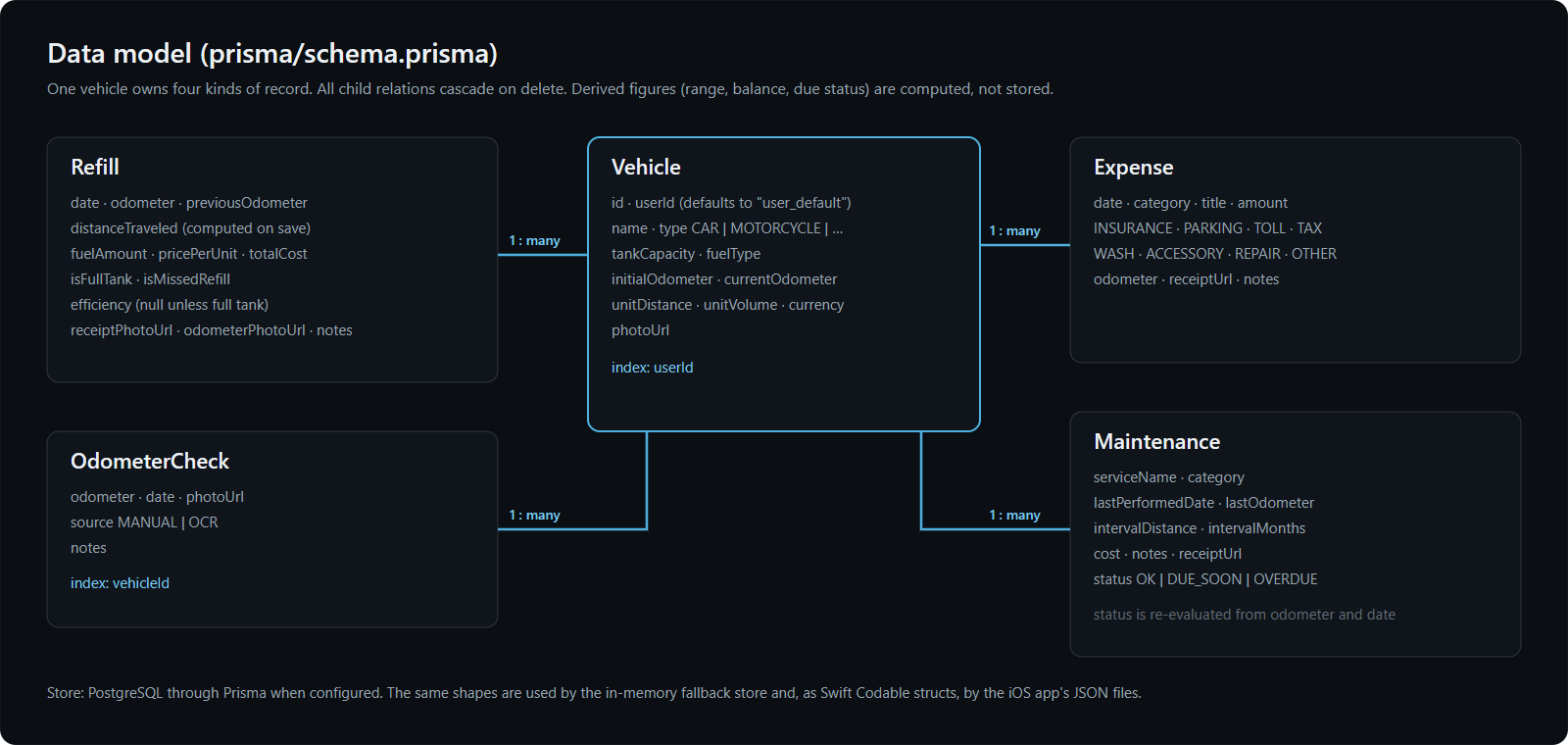
The repository holds three parts. The iOS app is the most developed: extraction on the phone, local data by default, and Google sign-in with opt-in sync to Supabase. The Next.js web app applies the same rules with OCR on the server, and it is the part shown in the screenshots below. A standalone Express backend with its own database and tests is built but not yet connected to either app. Nothing is deployed.
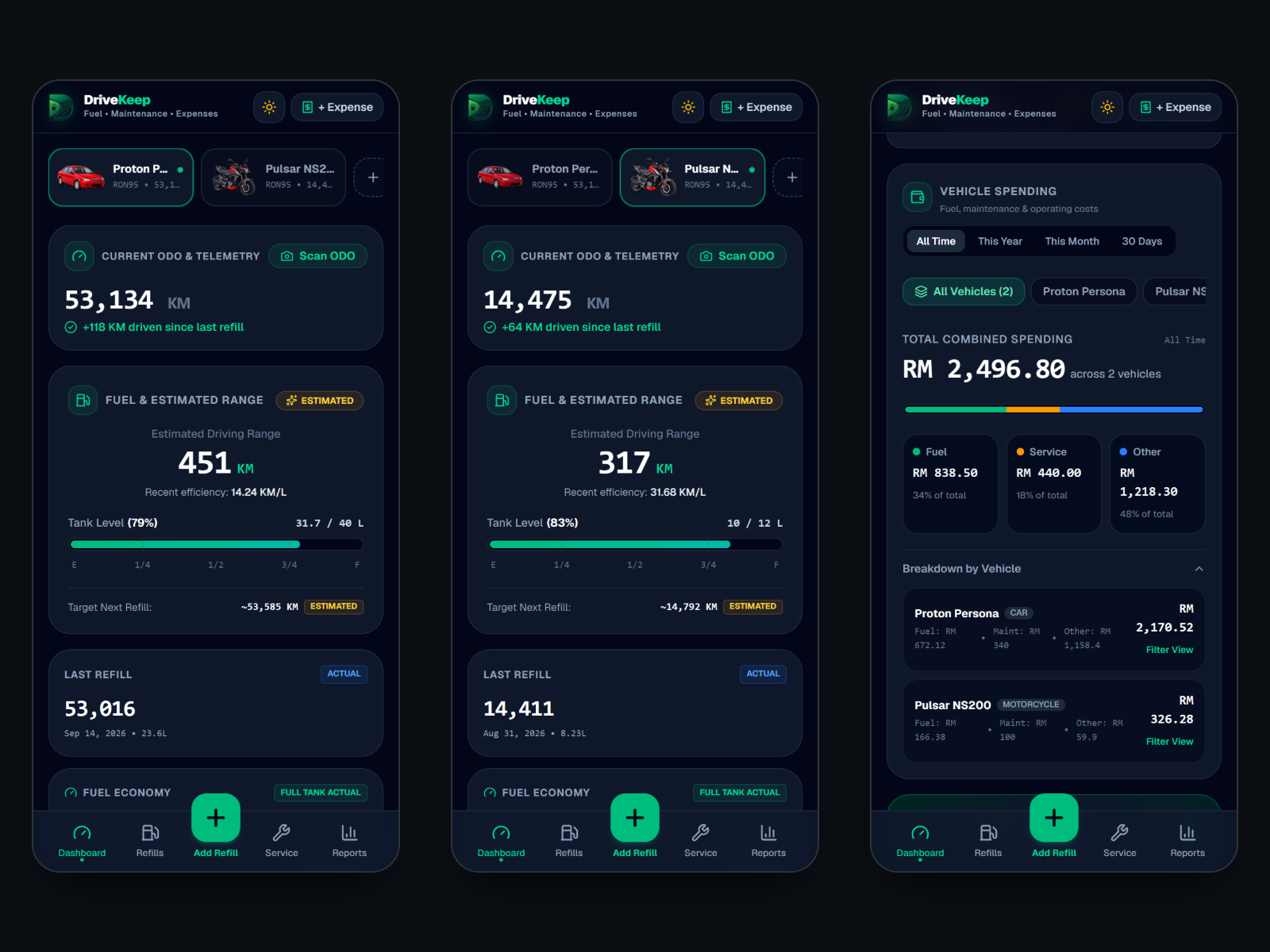
Problem
Tracking fuel by hand fails in predictable ways. The odometer is not written down at the pump, a top-up gets treated as a full tank and the economy figure jumps, one mistyped reading makes every later distance wrong, and a second vehicle ends up in the same sheet. A spreadsheet also cannot say how much fuel is probably left or when a service is due.
Logging a refill from two photos
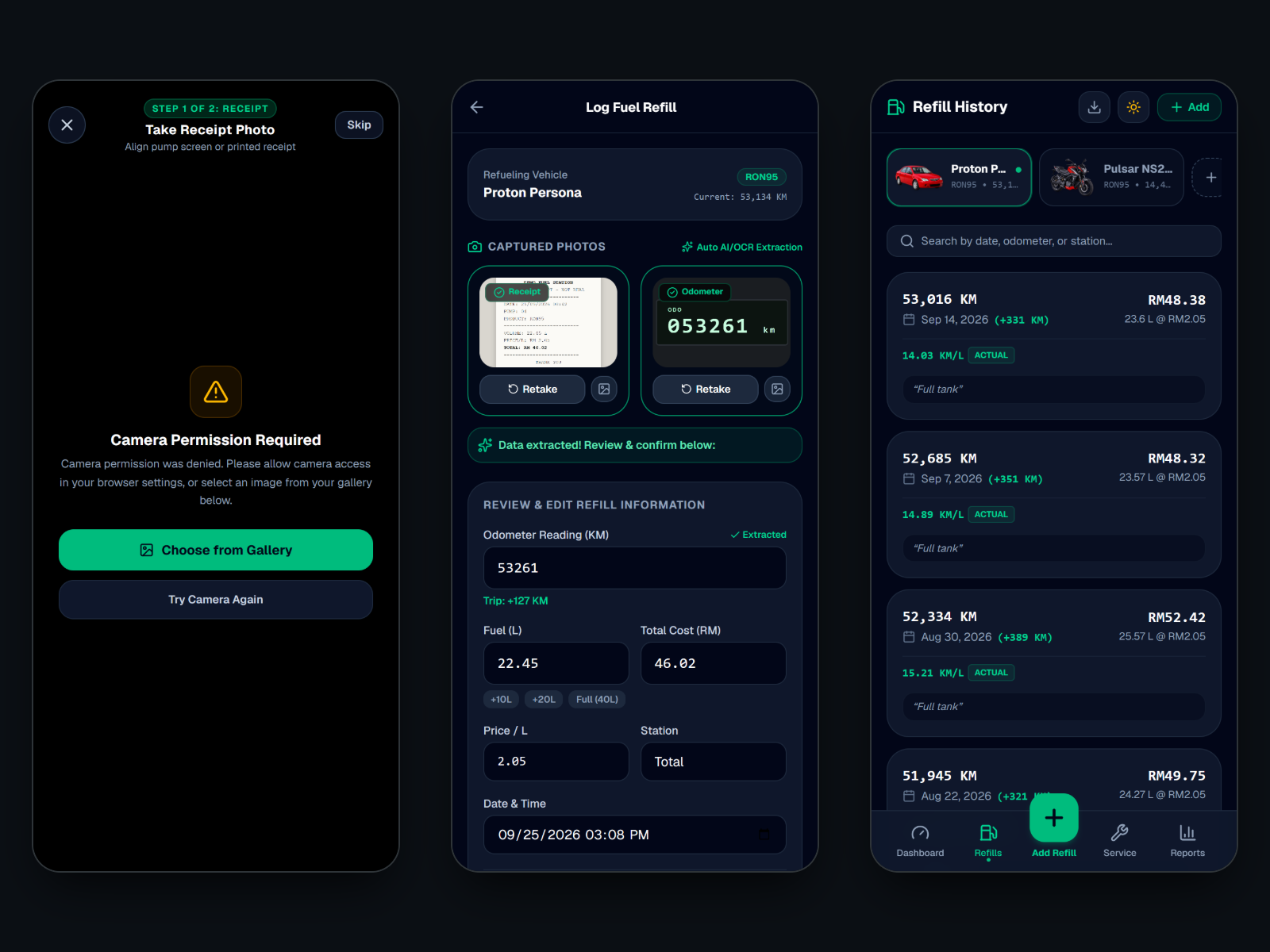
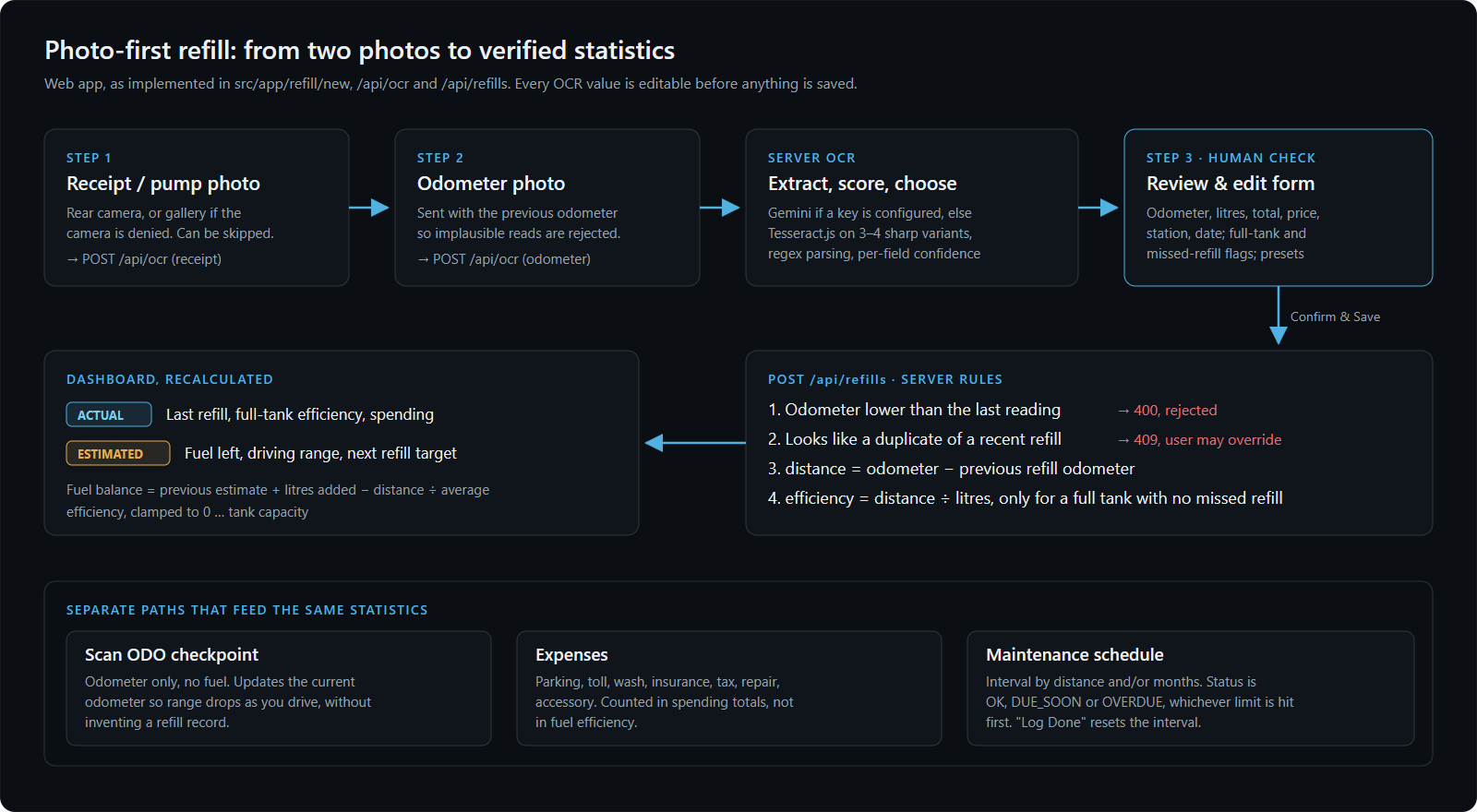
Add Refill asks for the receipt, then the odometer. On iOS both are read on the phone: an image check first rejects a photo that is not a receipt or an odometer, Apple's Vision framework reads the text, and on iOS 27 and later Apple's on-device Foundation Models return the litres, price and total as a structured result. Odometers go through their own path: the display is cropped, several readings are compared, and a reading has to be plausible against the previous one.
In the web app the photos go to the server, where sharp produces three or four preprocessed variants, Tesseract.js reads each, and the variant that parses into the most fields with the highest confidence wins. Either way nothing is saved from extraction alone: the values land in an editable form and only Confirm & Save sends them on. The web server then rejects an odometer lower than the last reading and flags a refill that looks like a duplicate.
Measured, estimated, or not available
Fuel economy is stored only for a full tank with no missed refill before it; a partial fill makes distance divided by litres meaningless. The fuel probably in the tank is carried forward refill by refill (previous estimate, plus litres added, minus distance over average economy, clamped to the tank size) and range follows from it. Both are labelled ESTIMATED.
The last change to the project removed every default that stood in for missing data. Earlier, a new vehicle showed a 75% tank and a 10 or 25 km/L economy it had never measured, and those numbers flowed into range and the refill target. Now the engine returns nothing, the card says "Not available", and the app asks for a refill instead.
Accounts and sync on iOS
The iOS app works on local data with no account. Sign-in is Google through Supabase, run in the system's authentication session so no Google SDK or client secret ships in the app; tokens and the Supabase configuration are kept in the Keychain only. An earlier build derived a user id from the email address on the phone. That id existed in no database, so every row-level security policy would have rejected it, and it was replaced with the real Supabase identity.
Cloud sync is off by default, so sign-in can be checked without pushing a single record. When it is switched on, records go to Supabase tables whose policies limit every row to its owner, deletes travel as tombstones so a record removed offline does not come back, photos are uploaded once, and changes queue while the phone is offline.
The iOS app could not be built or run for this write-up (the audit machine runs Windows), and the project has no automated iOS tests. The behaviour described here is from the source code.
Architecture
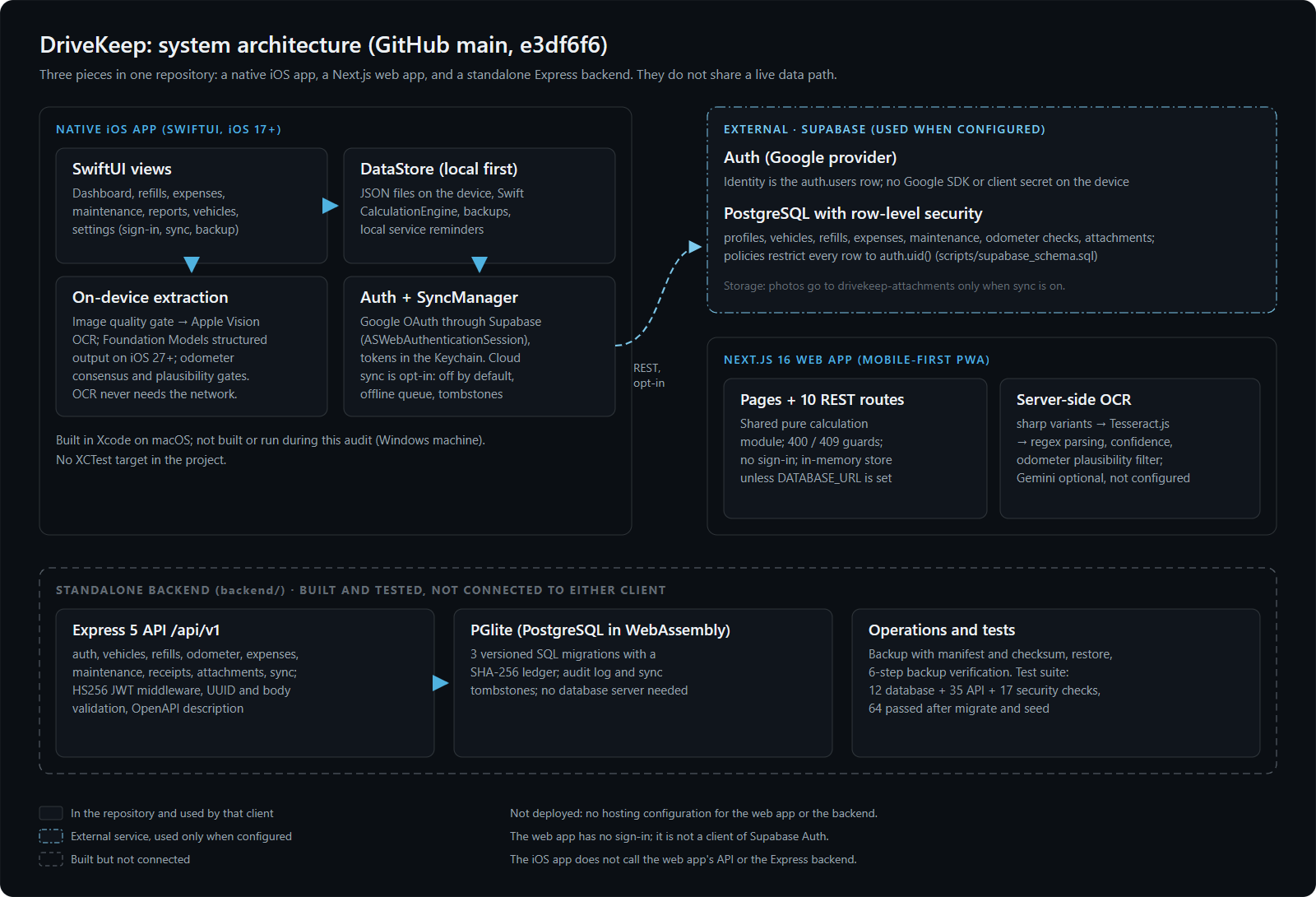
The three parts do not share a live data path yet. The iOS app keeps its data on the phone and optionally syncs to Supabase. The web app calls ten REST routes backed by Prisma and PostgreSQL when a database is configured, or an in-memory store otherwise. The Express backend is an API on its own PostgreSQL, run in-process with PGlite so it needs no database server, with JWT auth, versioned migrations, an audit log, sync tombstones, and backup, restore and backup-verification scripts.
Servicing and reports
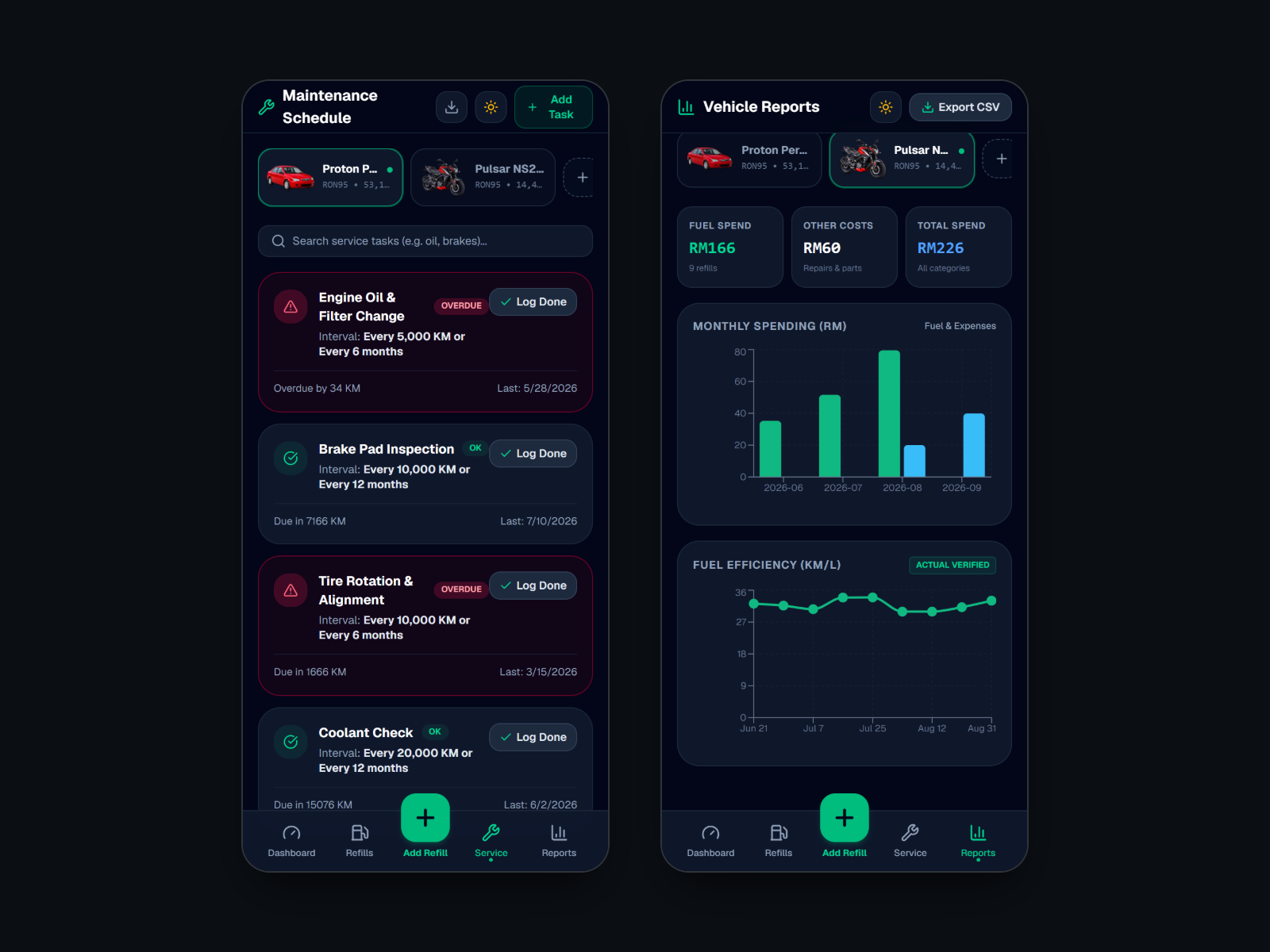
Each vehicle has its own service items with an interval in kilometres, in months, or both; an item is overdue when either limit is passed, so tyres can be overdue by time while still well inside their distance. Reports show monthly fuel against other spending and the economy trend, and the web app exports refills, expenses and the service schedule to CSV.
What went wrong, and what it taught
Defaults are claims. A 75% tank and a 10 km/L economy looked harmless as placeholders, but on screen they read as measurements and fed every estimate after them. Removing them made new vehicles look emptier and the app more honest.
Odometer digits confuse OCR. In a test of the web pipeline on a synthetic odometer display, the digits-only pass read 053261 as 953261. The plausibility check against the previous reading discarded it and 53,261 was used. Reading more than once and letting domain knowledge choose is what made the result usable.
Tests that depend on state are fragile. The backend's API and security suites pass 64 of 64, but only after the database has been migrated and seeded; on a fresh checkout they fail. The next step is for the suite to create its own database.
Testing and verification
On a fresh clone of the latest commit: the web calculation engine's test script passes 21 of 21 (12 scenarios and 9 regression checks); TypeScript, ESLint on the web source and the production build pass; the backend passes 12 database, 35 API and 17 security checks after migrate and seed. The security checks cover missing, forged and expired tokens, access to another user's records, SQL injection in paths and bodies, malformed JSON and invalid identifiers. The web screens here come from a local production build of that commit, including a real OCR call on a synthetic receipt.
Not verified: the iOS app (no macOS machine and no XCTest target), the Supabase sign-in and row-level security in a live project, and ESLint across the whole repository, which reports 30 errors in the backend's CommonJS scripts because the root configuration does not exclude them.
What's live, and what isn't
“It exists in the repository” and “it runs in production” are different claims. This is the difference, stated rather than left to be assumed.
- Built, not liveWeb app: photo-first refill, OCR, engine, guards, maintenance, reportsWorking in a local production build of the latest commit and covered by the engine tests. Not deployed.
- Built, not liveiOS app with on-device extractionSource complete for the main screens; not built or run during this audit, and no automated iOS tests.
- Built, not liveiOS sign-in and cloud sync (Supabase, RLS)Implemented and off by default. Not verified against a live Supabase project here.
- Built, not liveExpress backend with PGlite64 of 64 checks pass after migrate and seed. Not connected to either app.
- Not connectedWeb sign-in, one shared backend, deploymentNot built yet.
Technical stack
iOS app
Cloud (opt-in)
Web app
Backend (standalone)
Verification
Limitations
- Nothing is deployed.
- The web app has no sign-in; its API is open to anyone who can reach it.
- The three parts keep separate data: the iOS app uses Supabase, the web app its own database, and the backend is not used by either.
- No automated iOS tests, and the iOS app was not built for this write-up.
- The backend's tests need a migrated and seeded database.
- Web: refills and expenses cannot be edited or deleted, and the Reports total leaves out servicing while the dashboard includes it.
- The repository is private. Access can be granted on request.
What's next
- 01One backend for both apps
- 02Sign-in for the web app
- 03Unit tests for the iOS calculation engine and extraction
- 04Backend tests that create their own database
- 05Edit and delete for refills and expenses
- 06Deployment
Source and further reading
Finished the technical breakdown?
Return to the concise HR overview or discover other projects in the portfolio.