SpenDrop
SpenDrop: on-device expense capture from Malaysian payment screenshots
Product, iOS App & Share Extension, OCR Parser, Data Model, Tests
Operational Workflow & State Machine
End-to-End Pipeline- 01Share a payment screenshot
- 02OCR on the phone
- 03Classify amounts and detect provider
- 04Check for duplicates
- 05Confirm on the review form
- 06Save to the shared store
Overview
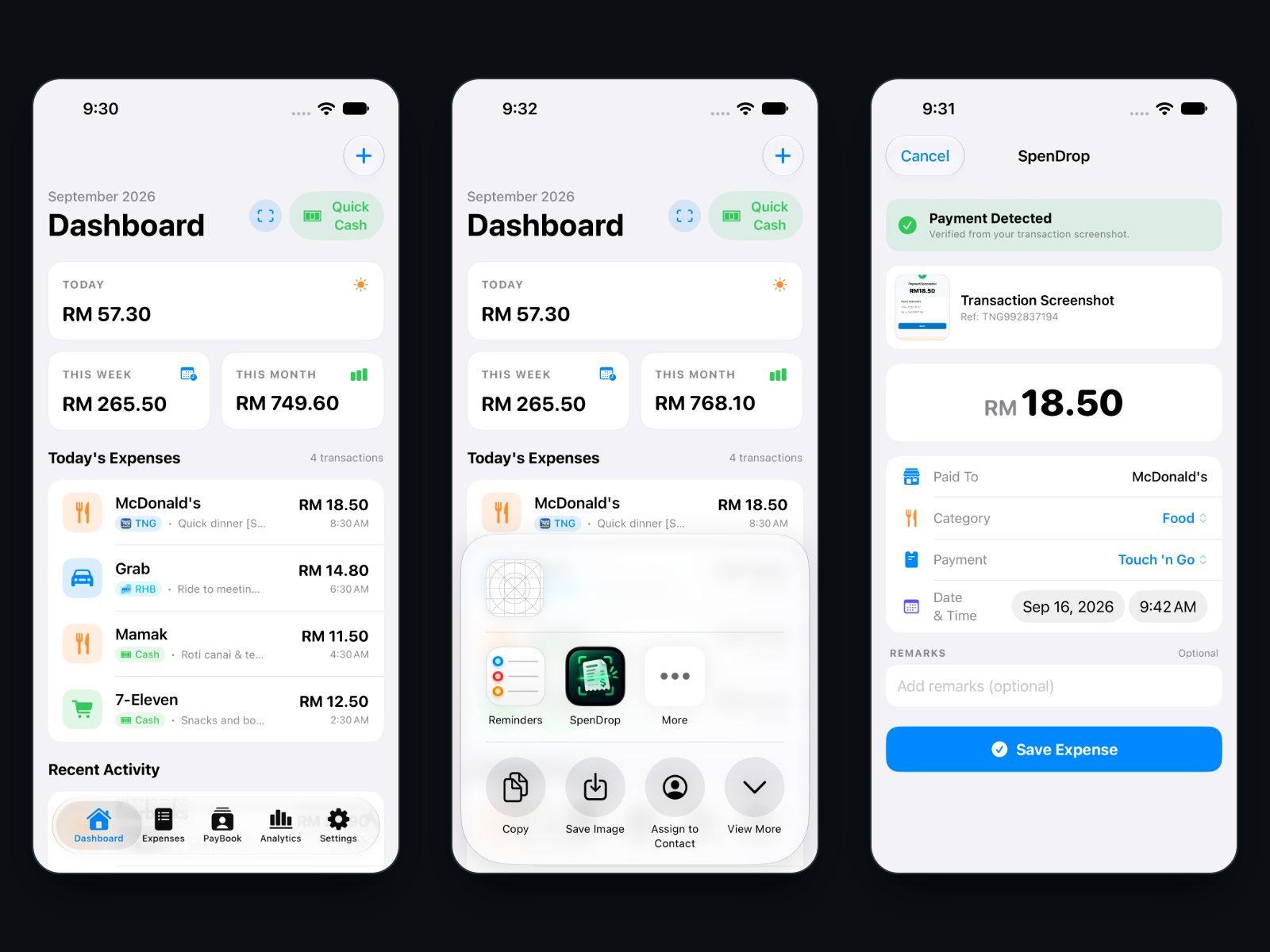
Most everyday payments in Malaysia now end with a confirmation screen: Touch 'n Go, a bank app, DuitNow QR, Apple Pay. SpenDrop turns that screen into an expense. Take a screenshot, share it to SpenDrop, check the form it fills in, and save. Cash spending goes in by hand with Quick Cash.
It is a native iOS app with a Share Extension, written in Swift and SwiftUI with SwiftData for storage and Apple's Vision framework for OCR. Everything runs on the phone: there is no server, no networking code and no third-party package. It runs on the simulator and on the developer's iPhone; it is not on the App Store.
Problem
Expense apps ask you to type what your phone already shows you. The payment screen has the amount, the merchant, the provider and a reference number, but copying them by hand is slow enough that most people stop doing it. And a payment confirmation is financial data: sending it to a server to be read is a poor trade for convenience.
From screenshot to expense
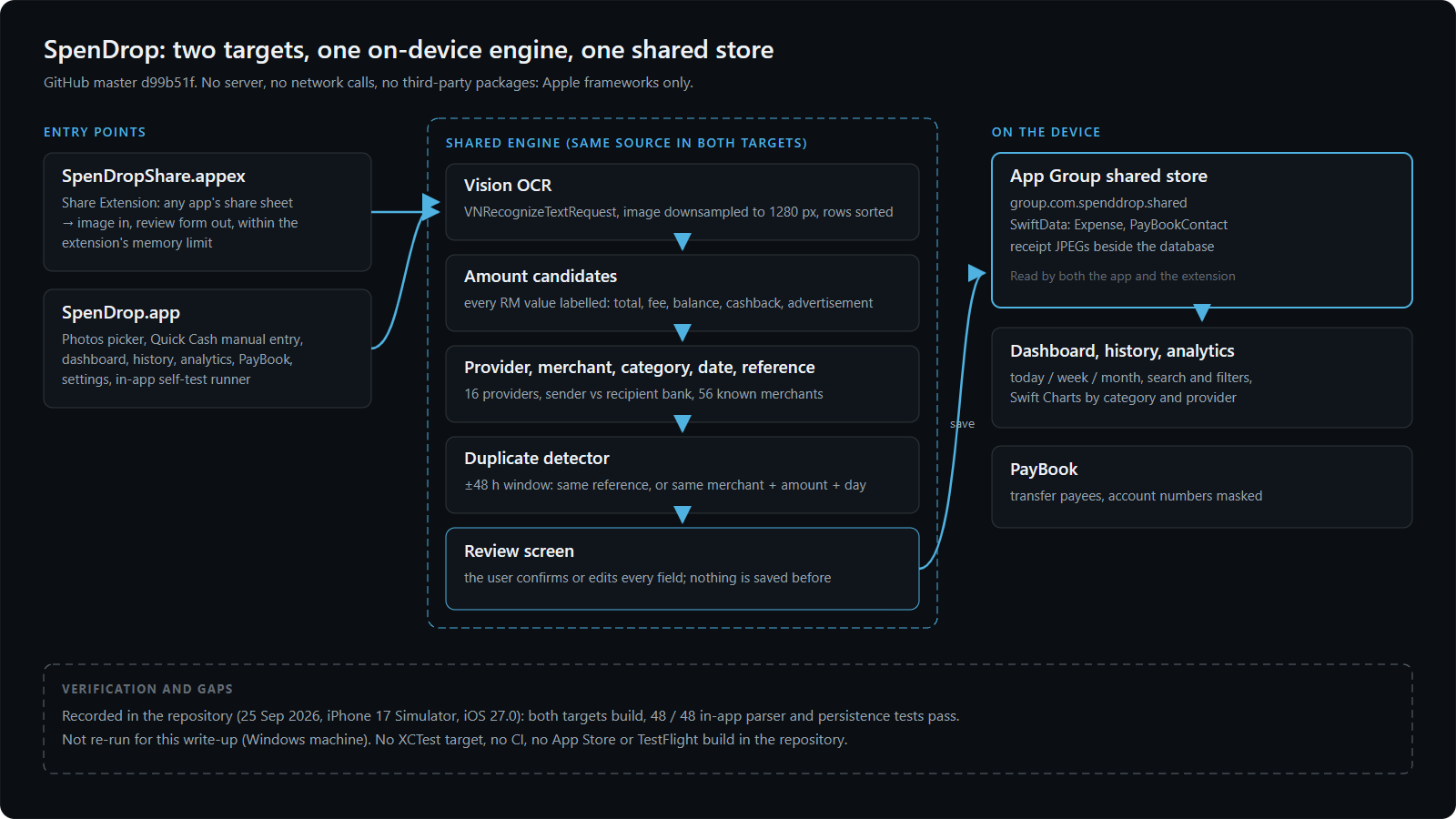
The Share Extension receives the image from any app's share sheet. Vision reads the text on the phone, on an image downsampled to 1280 pixels to stay inside the extension's memory limit, and the lines are sorted into rows. A rule-based parser then works out what the screen is: which provider, which merchant, which category, the date and time, and the reference number. The extension shows the result as a review form; nothing is saved until the user confirms.
The app and the extension are two separate processes, so they share one SwiftData store through an App Group. An expense saved from the share sheet is on the dashboard the next time the app opens, and the duplicate check in the extension can see everything the app has saved.
Choosing the right amount
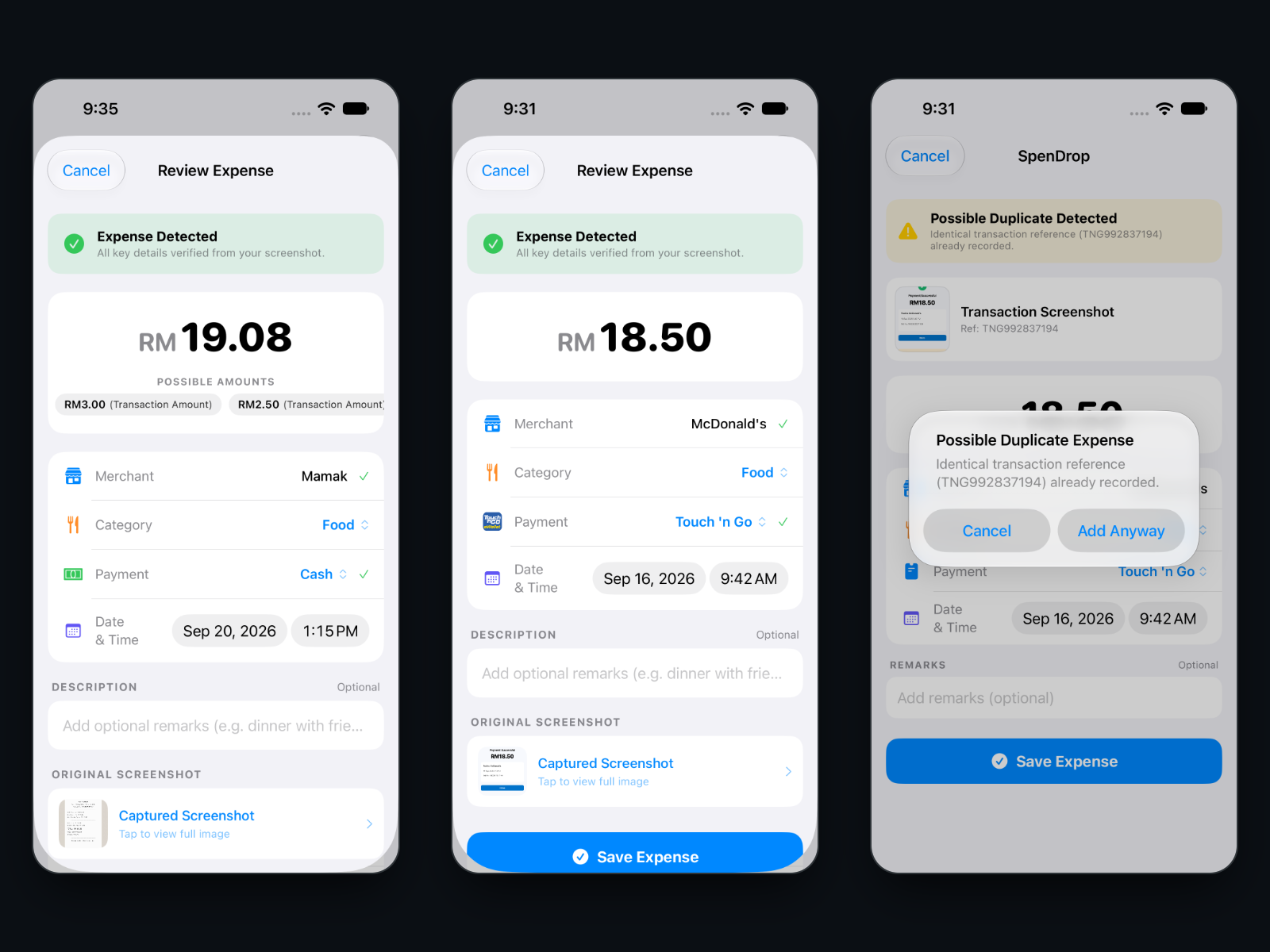
A payment screen rarely has one number on it. A Touch 'n Go confirmation can carry an advert for an RM 450 air conditioner under an RM 18.50 payment; a receipt lists a subtotal, a service charge and a total; a bank screen shows the balance. The parser labels every RM value it finds (total, fee, balance, cashback, discount, advertisement) and chooses from the valid candidates only. When several remain, the review form shows them as one-tap alternatives; when one remains, the row is hidden.
Screens that are not payments at all, such as a balance, a credit limit or reward points, are recognised and are not saved as expenses, or are flagged for review. Sharing the same screenshot twice is caught by its reference number, or by the same merchant and amount on the same day within a 48-hour window, and the user decides whether to add it anyway.
The rest of the app
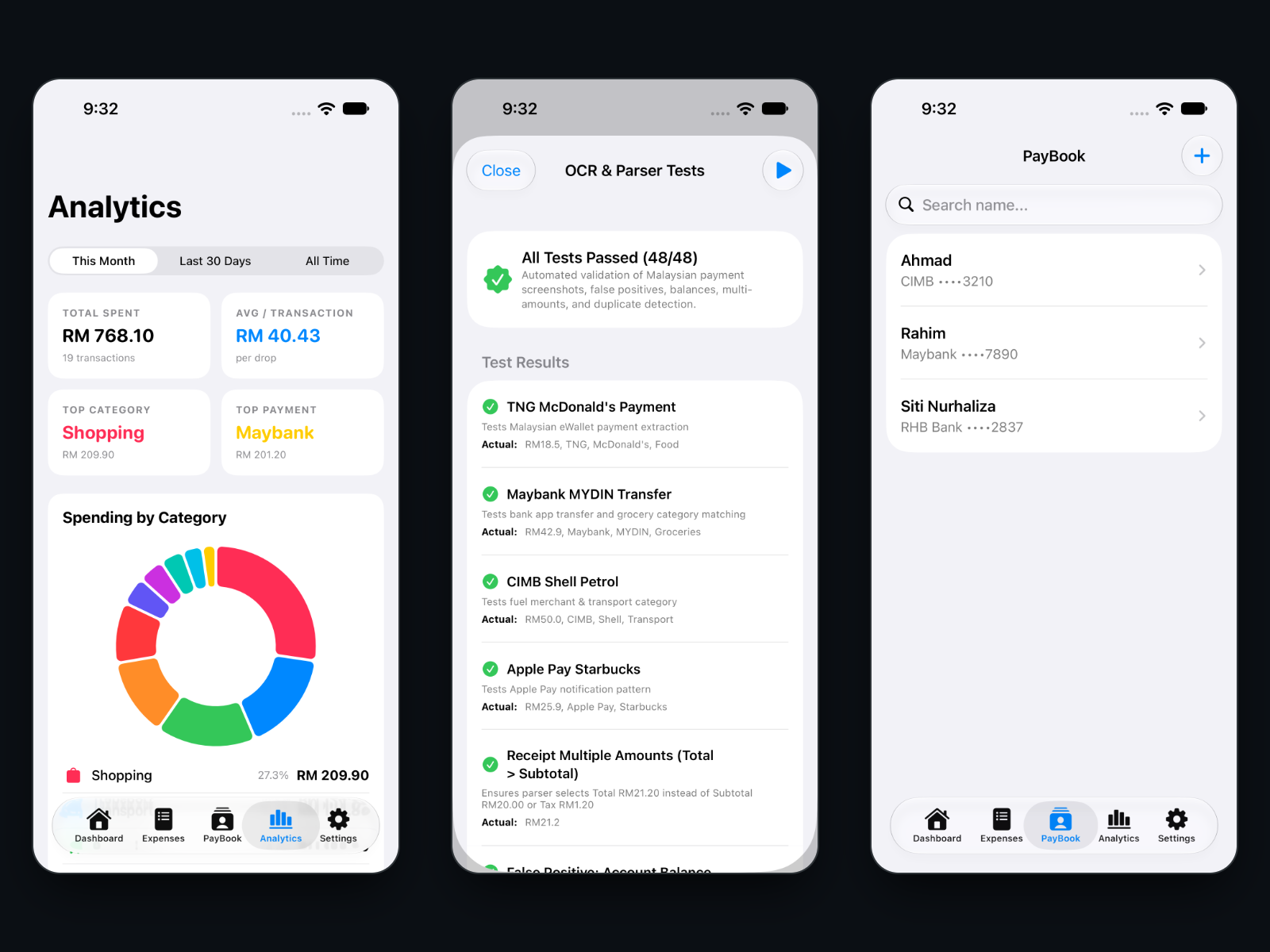
Around capture sits a small expense app: a dashboard with today, week and month totals, a searchable and filterable history with edit and delete, analytics by category and payment source built with Swift Charts, and PayBook, a list of frequent bank-transfer payees with account numbers masked by default and a one-tap copy. A settings screen includes a self-test runner that executes the app's 48 parser and persistence checks on the device.
What went wrong, and what it taught
Adverts looked like payments. A Touch 'n Go confirmation can show an RM 450 air-conditioner banner under an RM 22.00 transfer, and any pattern for an RM amount matches both. The fix gives every amount a meaning before any is chosen: advertisement keywords, the words on neighbouring lines, and position, using Vision's bounding boxes, since adverts sit in the bottom of the screen. Layout turned out to be a stronger signal than the text alone.
Interbank transfers name two banks. A CIMB to Maybank receipt mentions both, and the expense belongs to CIMB. Keyword matching alone was ambiguous, so the parser now reads the screen as a document: it collects the banks named after a recipient label first, then reads the from-block, and never attributes a payment to a bank that only appears as the recipient. Apple Pay is treated the same way, as a wrapper around the bank behind it.
Column-aligned receipts still break it. On a synthetic receipt with the label and the amount far apart, Vision returned "TOTAL" and "RM 19.08" as separate observations, the total lost its label, and a line item won. The review screen correctly downgraded to "Possible Expense Detected", and the case is recorded as a known limitation rather than hidden.
Testing and verification
The app carries its own test runner: 48 cases covering provider and merchant parsing, amount selection, false positives, duplicates and persistence, provider detection, ten reference screenshots from real layouts, and PayBook. The repository records a run on 25 September 2026 on an iPhone 17 simulator with iOS 27: both targets built and 48 of 48 passed. The suite feeds synthetic OCR text, so it tests the parser, not Vision's recognition quality.
For this write-up the source was checked directly: 42 Swift files, two targets (app and extension), 48 registered test cases, and no networking code. The tests were not re-run here because the machine used runs Windows. There is no XCTest target and no CI.
Every screenshot on this page is from the real app on a simulator. The payment screenshot and the receipt it reads are synthetic images made for testing; PayBook shows the app's built-in sample payees.
What's live, and what isn't
“It exists in the repository” and “it runs in production” are different claims. This is the difference, stated rather than left to be assumed.
- Built, not liveCapture, parsing, review, duplicates, history, analytics, PayBookWorking on the simulator and, per the repository, on the developer's iPhone. Not published on the App Store or TestFlight.
- Built, not liveIn-app test suite48 of 48 recorded on 25 September 2026; not re-run for this write-up.
- Not connectedCamera capture, currency setting, CINot implemented yet: capture is from screenshots and Photos, and all amounts are in RM.
Technical stack
App
Capture
Parsing
Verification
Limitations
- The parser is keyword-driven: an unfamiliar layout falls back to "Unknown" with low confidence.
- Column-aligned paper receipts can lose the label on the total, so a line item may be proposed instead.
- One synthetic screenshot read 9:42 PM as 9:42 AM.
- Save errors are swallowed rather than shown, and deleting an expense leaves its receipt image on disk.
- The extension's diagnostic log is not size-capped and contains transaction details.
- iPhone only, portrait only, English only; no XCTest target and no CI.
- The repository is private. Access can be granted on request.
What's next
- 01Report save errors instead of swallowing them
- 02Cap the diagnostic log and keep it to debug builds
- 03An XCTest target around the parser suite, run in CI
- 04Camera capture and the currency setting
- 05Delete receipt images with their expenses
Source and further reading
Finished the technical breakdown?
Return to the concise HR overview or discover other projects in the portfolio.